Tracing Docker BuildKit Execution in CI

Docker builds in CI are often slower than local builds, and harder to debug. Locally you can rebuild the image, watch the output, tweak the Dockerfile, iterate quickly. In CI you push a commit, wait for the runner, scroll through logs after the fact.
In GitHub Actions, you add caching with cache-from: type=gha, but the results are inconsistent. Some runs take 3 minutes, others 15. The build logs show CACHED next to some layers, but they scroll by too quickly to tell which steps actually ran versus which were pulled from cache.
BuildKit gives you the data, but in CI it’s hard to answer simple questions:
- Which Dockerfile step actually blocked the build?
- Was it a cache miss or time spent pulling and extracting cache?
- Did concurrency or runner constraints slow things down?
The core problem: build timing and cache behavior exist in a practical black box. The data exists, but you can't see that your npm install took 25 seconds, or that pulling cache added 4 seconds of extraction time, let alone correlate any of it with the rest of your CI pipeline.
BuildKit Execution Timelines in Orbit CI
The Orbit CI agent now captures detailed trace data from Docker BuildKit builds. Every layer, every cache hit, every extraction, all visible in a timeline view alongside your other CI steps. This matters because BuildKit performs many operations concurrently. Cache pulls, layer extraction, and build steps often overlap, and in text logs this interleaving makes it hard to reason about what actually blocked the build. A timeline makes concurrency and contention visible.
Here's what it looks like in practice. This is a typical Node.js multi-stage Dockerfile build running in GitHub Actions:
- name: Build image (cold - writes cache)
  uses: docker/build-push-action@v6
  with:
    context: ./my-app
    file: ./my-app/Dockerfile
    push: false
    tags: my-app:latest
    no-cache: true
    cache-to: type=gha,mode=max
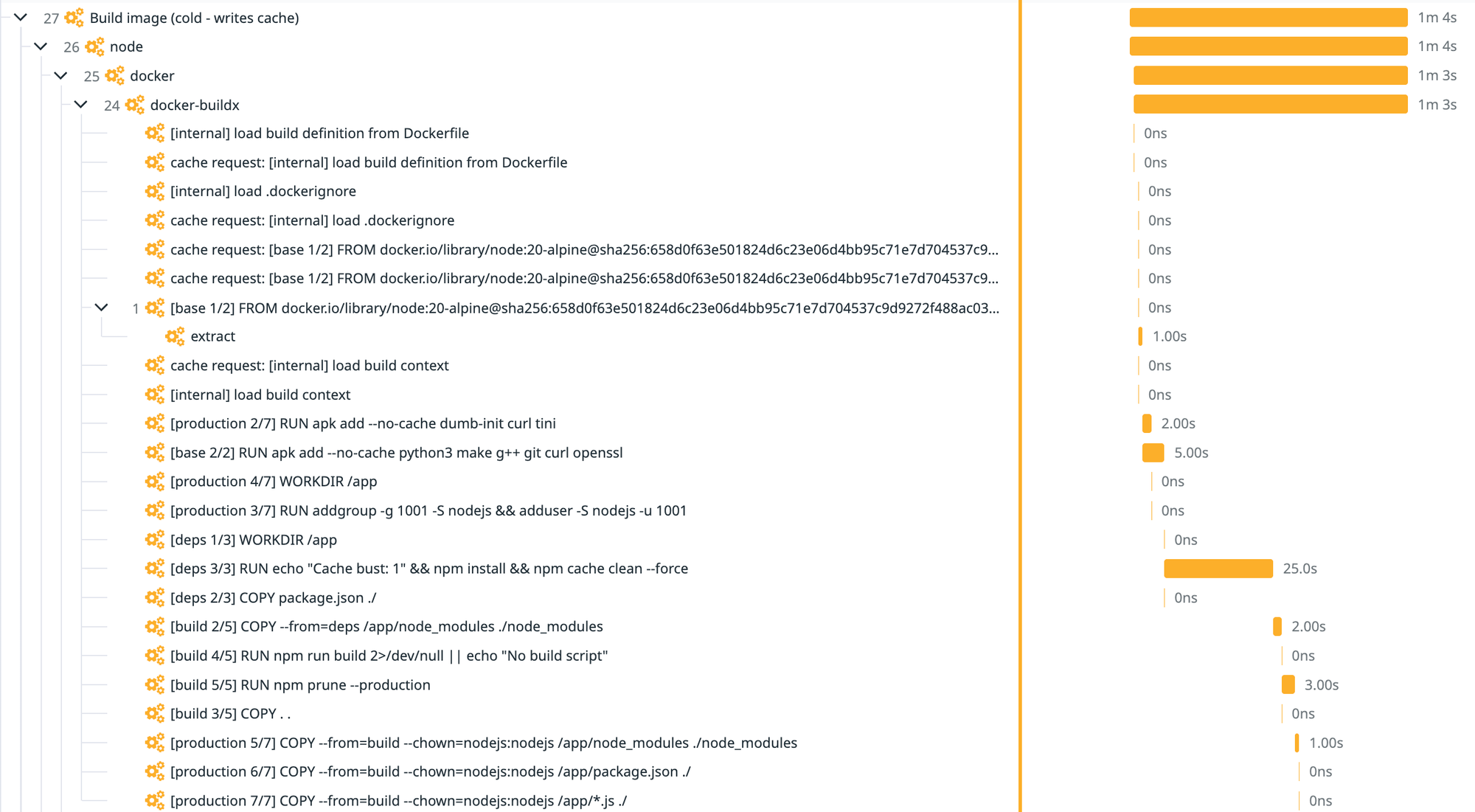
The trace shows each Dockerfile instruction as a separate span with its actual duration:
[deps 3/3] RUN npm installtook 25 seconds[base 2/2] RUN apk addtook 5 seconds[build 5/5] RUN npm prune --productiontook 3 seconds- Quick steps like
WORKDIRandCOPYshow as 0 ns since they're essentially instant
Now here's the same Dockerfile with caching enabled:
- name: Build image (cached - reads cache)
  uses: docker/build-push-action@v6
  with:
    context: ./my-app
    file: ./my-app/Dockerfile
    cache-from: type=gha
    build-args: |
      CACHEBUST=${{ github.run_id }}
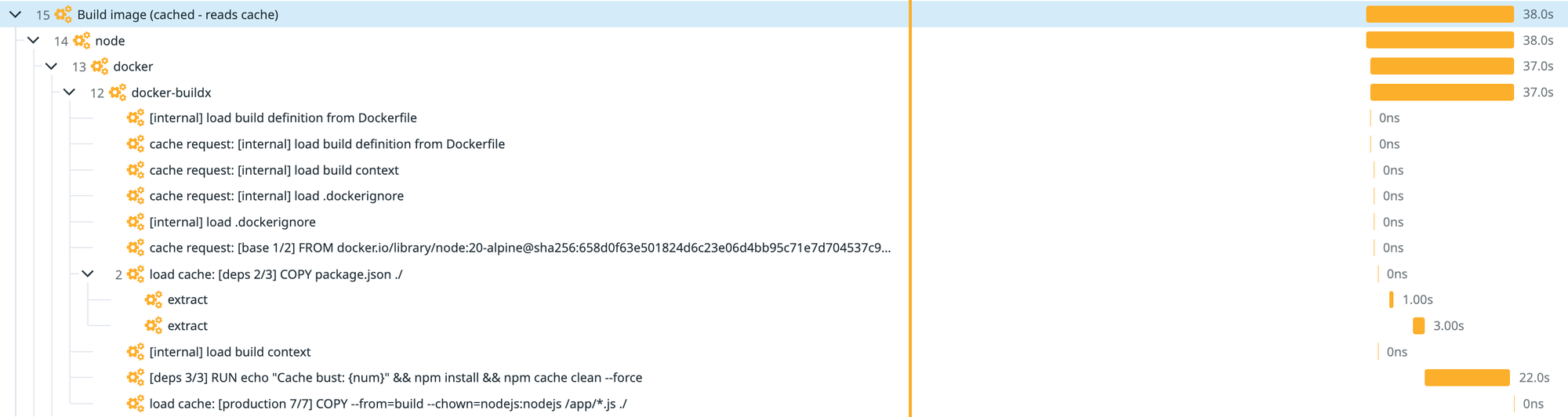
Notice the difference:
- Instead of
[deps 3/3] RUN npm installtaking 25 seconds, you seeload cache: [deps 2/3] COPY package.json ./with twoextractchild spans - The cache is being pulled from GitHub Actions cache storage and extracted, taking about 3-4 seconds total instead of 25
- Fewer spans overall since cached steps are short-circuited entirely. Intermediate layers pulled from cache don't appear in the trace
- The
CACHEBUSTbuild arg forces[deps 3/3]to re-run (that's the 22-second bar), but everything before it comes from cache
One subtle but important distinction is execution time versus wall-clock impact. A cached RUN step may not execute any user code, but pulling cache layers still consumes wall-clock time for network transfer and filesystem extraction, time that directly affects CI duration but is largely invisible in traditional build output.
This is how you verify your cache strategy is actually working: by seeing the actual execution timeline instead of guessing from scrolling logs.
Using BuildKit Tracing
The Orbit agent uses eBPF to track buildx processes and BuildKit APIs to capture trace data automatically. BuildKit exposes a lot of information, but we filter it down to the details relevant to your build and CI context.
To enable tracing, run the Orbit agent in your pipeline. No changes to your Dockerfile, BuildKit configuration, or CI pipeline code. It's a drop-in agent that works with your existing setup.
Reach out to us at hello@orbit.ci to get started with Orbit CI and gain visibility into your Docker builds across all your CI pipelines.
No spam, no sharing to third party.